
China is close to cashless. A street vendor selling grilled skewers outside Hengdian will hand you a printed QR code, not a card machine. If your phone cannot pay, your trip gets very difficult very quickly — and the smaller the filming location, the truer that gets. This is the practical version of how to pay in China — what to install, what to test, and what to do when a payment fails in front of a queue.
The short answer: How to pay in China comes down to two apps. Set up Alipay as your primary wallet and WeChat Pay as backup, both bound directly to a foreign Visa or Mastercard, before you fly. Complete passport verification in both apps — it is what unlocks the usable spending limits — then test one ¥5 purchase. Carry ¥1,000–2,000 in small notes, because personal QR codes (the kind small vendors use) are the one thing foreign cards reliably fail on. Two things most old guides get wrong: the 3% fee applies to the whole amount once a payment goes over ¥200, and the old Alipay Tour Pass mini-program has been retired — do not follow instructions that tell you to top it up.
Checked against published sources, September 2026. The card networks, fee thresholds and limits below reflect Alipay and WeChat Pay’s 2026 rules for foreign-issued cards, cross-checked against the wallets’ own help pages, Chinese government guidance for inbound visitors, and independent guides. Payment apps change their terms without much notice, and a few of the figures here have already moved more than once — so confirm the current screen inside the app before you rely on a large transaction.
Why how to pay in China is the second thing you sort out, after your visa
China skipped the card era. Contactless bank cards work at four- and five-star hotels, high-end malls and airport counters — and almost nowhere else. The everyday economy runs on QR codes: taxis, street food, small shops, temple tickets, rural guesthouses, the shuttle bus to a filming site.
For set-jetting this bites harder than it does for a city tourist, because the locations you came for are in small towns. Duyun in Guizhou, the villages around Hengdian, the old town of Shaxi — these have far fewer card terminals than Shanghai, and the businesses that do take cards are exactly the ones you are least likely to use. Cash is accepted, but nobody keeps change, so a ¥100 note for a ¥12 bowl of noodles is a small problem you will repeat all day.
Which method, and in what order
| Method | Works where | Verdict |
|---|---|---|
| Alipay | Convenience stores, restaurants, Didi, metro, most tourist payments | Set this up first — smoothest for first-time visitors |
| WeChat Pay | Daily life, mini-programs, small local merchants, peer transfers | Set up second, as redundancy. More likely to hit risk-control checks |
| Physical bank card | Hotels, upscale stores, some airports | Useful as a deposit card, not for daily spending |
| Cash (¥) | Small stalls and vendors using personal QR codes, plus network failures | Keep ¥1,000–2,000 in small notes — this is the payment method for a real category of seller, not just a backup |
If you only set up one, make it Alipay. But set up both if you can — WeChat is also how guesthouses and small operators often prefer to talk to you, so you will probably install it anyway.

N509FZ / Wikimedia Commons, CC BY-SA 4.0
Setting up Alipay, step by step
- Install the app before you fly, on your home network. Inside China the Apple App Store may serve a different storefront and Google Play is unreachable, which turns a five-minute job into an afternoon.
- Register with your home mobile number. You need to receive an SMS, so make sure roaming works or do this on Wi-Fi.
- Complete identity verification with your passport — a photo of the data page plus a live selfie. Approval normally takes one to three minutes during Chinese business hours.
- Add your card under Cards → Add Card. Visa, Mastercard, JCB, Discover, Diners Club and UnionPay are accepted across both apps. American Express is accepted by Alipay; reports differ on whether WeChat Pay’s foreign-card programme takes it, so if Amex is your only card, make Alipay your primary and carry a Visa or Mastercard as backup. No Chinese bank account is needed.
- Switch the interface to English in Settings if it has not defaulted to it, and set a payment password.
Then test it. Buy a ¥5 bottle of water somewhere. A card that silently fails at a ticket window is the most common first-day problem, and you want to discover it while you are relaxed, not while a taxi driver waits.
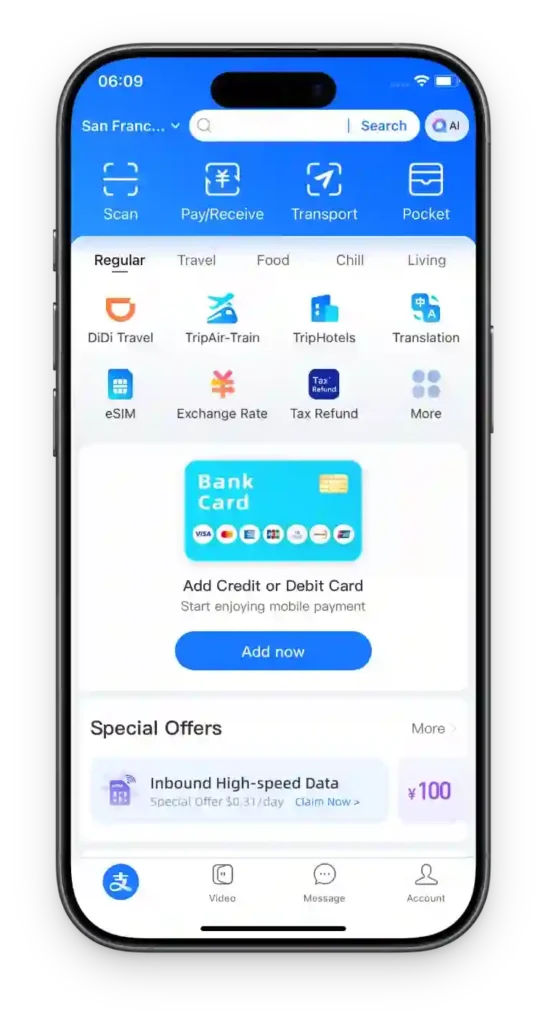
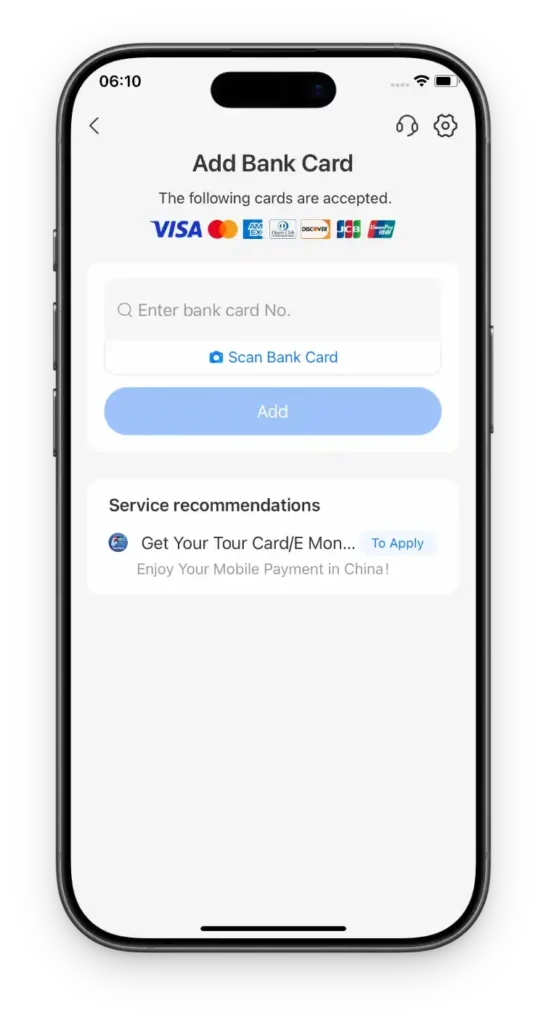
If the card won’t link: the messages you will actually see
Adding a card is the step where most people get stuck, and the error messages are not written for you. Here is what each one means. Work through the first three before you try anything else.
| The message | What it means, and the fix |
|---|---|
| “Issuer not supported” | Most prepaid cards and gift cards are not accepted, and some smaller banks block international transactions by default. Use a card from a major bank. If you are using a virtual card such as Wise, make sure it has a full billing address on file, and ask your bank to authorise transactions in China. |
| “Card status abnormal” or “expired” | The card is expired, frozen, or has international payments switched off. Unlock international transactions in your banking app, or call the bank. |
| “Information mismatch” | The name on the app must match your passport and your bank record exactly — “John Doe” is not “Doe John”. The billing address must match what your bank holds, spelled out in full rather than abbreviated. |
| “Invalid CVV” | Re-enter the three- or four-digit code. If your card uses a dynamic CVV that changes every hour, the app will often reject it — a card with a static code works better. |
| “System busy” or “operation failed” | Usually the network or an out-of-date app. Switch from Wi-Fi to mobile data, update the app, and try again. |
| SMS verification fails (3-D Secure) | That code comes from your bank, not from Alipay. You need roaming on so your home number can receive it. |
| “Restricted from performing this operation” | Too many attempts in a short window, or the same card on several accounts. Stop, and wait 24–48 hours before trying again. If it persists, verify your identity in the app with your passport. |
| “Payment limited” or “failed” | A foreign card can only pay merchants — not transfer money to a person, send a Red Packet, or buy financial products. Check you are paying a business, and start with a small purchase to warm the card up. |
One detail that catches people out later: the six-digit payment password you set is not your bank card PIN. It is a separate app password, asked for on larger payments — memorise it rather than storing it only on your phone.
WeChat Pay — and why it sometimes refuses you
WeChat Pay lives inside WeChat: Me → Services → Wallet → Cards. The setup is similar, and passport verification is the step that matters.
Where it differs is risk control. WeChat is noticeably more likely than Alipay to ask a new foreign account for extra verification, or to temporarily limit payments. If that happens, do not spend your trip fighting it — Alipay alone covers almost everything you will need. Treat WeChat as redundancy, not a necessity.
One SMS problem to plan around. Some carriers do not reliably deliver the short-code SMS that both apps send during registration, especially when you are roaming. If your code never arrives, try again on hotel Wi-Fi, or complete registration before you leave home. This is the single most common reason people end up setting these up in a hotel lobby on day one.
What it actually costs
| Transaction | Fee on a foreign card |
|---|---|
| ¥200 or less | No platform fee. Both Alipay and WeChat Pay waive it |
| Over ¥200 | 3% of the whole amount — not just the part above ¥200. A ¥600 dinner costs ¥18, and it is charged on the full ¥600 |
| Refunds | The platform fee is returned along with the refund |
| New WeChat Pay users | An extra promotional waiver on daily spending up to ¥1,000, running from your first transaction — announced at 60 days, and re-announced at 90 in a later round. Check the current terms in the app |
| Your own bank | A foreign-transaction fee and exchange-rate markup apply on top, typically 1.5–3%. This is separate from the platform fee and is not refunded |
Three practical consequences. First, the ¥200 line is the whole game: a ¥600 group dinner paid in one go costs ¥18, while three ¥200 payments cost nothing. Second, the 3% is charged on the full amount, so it is never a marginal cost — it is a cliff. Third, a card with no foreign-transaction fee saves real money over a ten-day trip and is worth arranging before you go.
On limits: once your passport is verified, both Alipay and WeChat Pay publish the same ceilings — about US$5,000 (roughly ¥35,000) per transaction and US$50,000 (roughly ¥350,000) per year for linked international cards. Two details matter more than the numbers themselves:
- The cap is tracked against your passport, not your card. Binding a second or third card does not create extra headroom — it draws on the same allowance.
- Before verification, the caps are far lower. WeChat Pay’s published entry tier is around ¥6,500 per transaction, ¥50,000 a month and ¥65,000 a year, and Alipay’s is lower still. Verification is what unlocks the top tier.
Treat the figures as ceilings rather than promises. Your own bank’s limits, the merchant’s category and the platform’s risk controls can all produce a lower usable amount — so a declined payment does not automatically mean you have hit the cap. And verify your passport on day one, not at the counter: a hotel asking for a ¥3,000 deposit will be declined on an unverified account.
Do not follow Tour Pass instructions. The Alipay Tour Pass mini-program — a prepaid card you used to top up — has been retired. Blog posts and videos still recommend it, and readers who follow them get stuck looking for a menu that no longer exists. Direct card binding inside the main Alipay app does the same job with higher limits and no top-up fee.
What a foreign card cannot do
This catches people out, because it is the one place where a linked foreign card behaves differently from a Chinese account. An international card can pay merchants, and nothing else.
| Action | Foreign card |
|---|---|
| Scan a merchant’s QR code, or be scanned by a cashier | Works — shops, restaurants, Didi, metro, ticket offices |
| Send money to a person (P2P transfer) | Blocked |
| Send a WeChat red packet or Alipay 口令红包 | Blocked |
| Top up your WeChat balance or Alipay balance | Blocked — so a stored balance is not an escape route |
| Buy wealth products or funds | Blocked |
The practical version: when a Chinese friend offers to pay for the group and asks you to send them the money afterwards, you cannot transfer it back. This is the single most common awkward moment for visitors. Settle it in cash, or work it out outside the app — do not waste an hour trying to find a workaround, because topping up the balance is blocked too.
Paying at the places on this site
| Where you are | What works | What to have ready |
|---|---|---|
| Hengdian World Studios | Alipay/WeChat QR everywhere — ticket office, food street, shuttle | App set up; the site is a full town, so treat it like one |
| Duyun, Guizhou | QR in town; small village vendors often use personal codes | The fullest cash float on this list — the outer sites are where you will need it |
| Dali & Shaxi, Yunnan | QR throughout the old towns; cash welcome at market stalls | Cash for markets, app for everything else |
| Xiangyang, Hubei | QR in the city; the studio complex takes QR at the gate | App; cash only as backup |
| Shanghai | Everything, plus physical cards at hotels and malls | Nothing special — the easiest city on the list |
The pattern is consistent: the app handles the town, cash handles the edges. Plan for the edges to appear in exactly the places you care most about visiting.
When it fails: a 60-second recovery plan
Work down this list before you panic. In most cases one of the first three fixes it.
- Is the app verified? Unverified accounts get declined on larger payments. Finish passport verification.
- Did your bank block it? Tell your bank you are travelling in China and ask them to allow the transactions. This is very common on first use.
- Is the merchant’s QR a personal one? A personal transfer code — the kind many small vendors display — is the most common reason a foreign card is declined. Try the other app once; if that fails too, pay cash. Do not stand there retrying the same code.
- Is the network weak? Mountain and rural sites have patchy signal. This is exactly when cash earns its place in your bag.
- Is WeChat the problem? Switch to Alipay. Do not debug WeChat standing in a queue.
Cash: how much, and where to get it
Carry ¥1,000–2,000, mostly in ¥10, ¥20 and ¥50 notes. That is more than most guides suggest, and the reason is specific: the failure you are insuring against is not a dead phone — it is a merchant whose QR code your card will not pay.
There are two kinds of QR code in China, and the difference decides whether your card works. A merchant code is registered to a business and is processed as a normal card payment, so a foreign card goes through. A personal code is somebody’s individual transfer code, and foreign-card risk controls decline these far more often. Street stalls, village shops and the small vendor outside a filming site very often use the personal kind.
When that happens you have no alternative, and it is precisely those vendors who keep no change — so a ¥100 note for a ¥12 bowl of noodles becomes a small problem you repeat all day. Cash is not a backup for the case where everything else fails; it is the payment method for a specific, common category of seller.
Withdraw from a bank ATM rather than a currency exchange counter. The large commercial banks — Bank of China, ICBC, China Construction Bank, Bank of Communications — take Visa and Mastercard at their machines and have English interfaces. Expect a per-withdrawal limit of roughly ¥3,000–5,000, depending on the machine and on your own bank.
One cost warning worth knowing before you rely on this: withdrawing on a credit card triggers a cash-advance fee from your issuer, which is usually far worse than the payment fees above. If you plan to take cash out, use a debit card with no foreign-transaction or ATM fee — cards in the Charles Schwab or Wise family are the usual recommendation — and tell your bank you are travelling so the withdrawal is not flagged.
Keep the cash somewhere other than the phone you are paying with. The whole point is that it works when the phone does not.
Common questions
Do I need a Chinese phone number?
No. Both apps accept a foreign number — including a US, UK or Taiwan, China number — as long as it can receive SMS. A Chinese SIM is not required for payments.
It is still worth considering one, though, for everything around the payments: some ride-hailing and food-delivery flows, booking rail tickets inside the 12306 mini-program, and connecting to public Wi-Fi that asks for a local number. Treat it as a convenience, not a prerequisite.
Can I pay for high-speed rail tickets in the app?
Yes — once your identity is verified, the official rail app accepts Alipay. See our high-speed rail guide for the booking flow.
Will my card work at all?
Visa and Mastercard are the most reliable. Some debit cards fail where credit cards succeed, so if one card will not bind, try another before assuming the app is broken.
Can I use it on the metro?
Usually yes, but you often need to activate a city transport QR inside the app first — this is a separate step from adding your card. Do it once, in advance, rather than at a turnstile with a queue behind you.
Is it safe?
The systems themselves are secure and used by hundreds of millions of people daily. The realistic risk is a dead phone battery. Carry a power bank and a little cash, and you have covered the actual failure modes.
Your next move
Worried about the practical stuff?
Alipay and WeChat Pay sit alongside the other essential apps.
Ready to go?
Payment is one door. The planning hub covers the rest.
Last verified
Sources: People's Bank of China — foreign-visitor mobile-payment limits raised to US$5,000 per transaction / US$50,000 per year (via gov.cn) · People's Bank of China — Guide to Payment Services in China (official bilingual guide)
Spotted something out of date? Email us — or read how corrections work. We check every report against the source and update the page.
Ready to plan it? Turn the dramas you have watched into a day-by-day route with the C-drama route planner.
Not sure where to start? Take the drama-city quiz — seven questions, one city, and a route waiting at the end.