
You do not need twenty apps. You need five that work, installed and logged in before you land, with offline data downloaded. The rest is noise that will confuse you at a ticket window. This is the short list of China travel apps that actually work on a mainland network.
The short answer: Five China travel apps cover almost everything. Alipay and WeChat Pay (payment), Amap or Apple Maps (navigation), a translation app with offline Chinese, the official 12306 rail app or Trip.com (trains), and DiDi (taxis). Everything Google — Maps, Translate’s live features, Gmail — is unreliable or blocked on mainland networks. Install all of them, and complete any identity verification, before you fly.
The five China travel apps that matter
| App | Why | Notes |
|---|---|---|
| Alipay | Payment, and a lot more | Mini-programs inside it can book trains, taxis and attraction tickets. Closer to a super-app than a wallet. |
| Payment, and how China talks | WeChat Pay lives inside it. Some guesthouses and small operators will only contact you here — you will probably install it anyway. | |
| Amap (高德地图) | Real navigation in China | Has an English mode. Far more accurate than Google Maps for Chinese addresses and public transport. |
| Translation app | Reading signs and menus | Download the offline Chinese pack. Camera translation is the single most useful feature when you are standing in front of a ticket machine. |
| 12306 or Trip.com | High-speed rail | For visitors from outside China, book with your passport: 12306 is the official channel; Trip.com provides an English interface for passport holders. |
| DiDi | Taxis you can actually order | English interface, works with a foreign card, shows the fare up front. Essential outside Shanghai. |
Buying tickets as a visitor from outside China: use your passport for real-name rail booking. Start with the official 12306 app; use Trip.com if you need an English booking flow. The document used at booking is the one to carry for boarding. Attraction tickets are different: official mini-programs inside Alipay or WeChat may be Chinese-only and may not accept every foreign document. Check the operator’s current instructions; if the form or self-service machine will not take your passport, use the staffed ticket window where available. The destination guide should name the exact operator and fallback.
Three of them are worth showing, because the listing is where most people get stuck — searching for an app that is not in their home storefront.
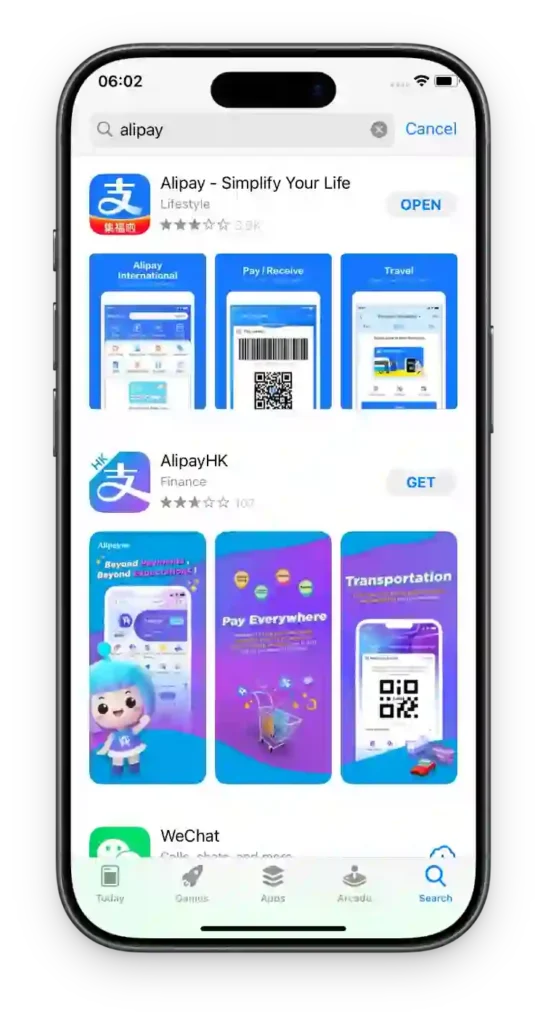
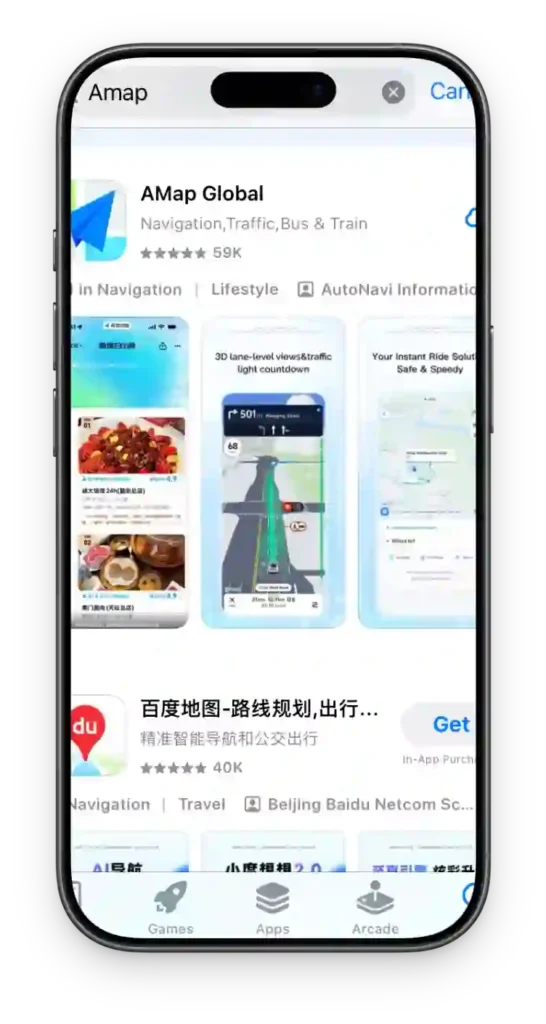

Two wallets, and why you want both
Payment is the one thing you cannot improvise on arrival, so it gets its own note here — and the detail lives on our payment guide, which covers the fees, limits and the QR-code traps properly. What matters for this page is simply: install both, verify your passport in both, and test a small payment before you leave.
- Alipay is the more reliable of the two for a foreign card. If you only set up one, make it this one.
- WeChat Pay is the one that sometimes refuses you. New foreign accounts are more likely to be asked for extra verification or temporarily limited. Do not debug it while standing in a queue — switch to Alipay and sort it out later.
- Verification is what unlocks the usable limits. Both apps publish much lower ceilings for unverified accounts, and the cap is tracked against your passport — binding extra cards does not create extra headroom.
Ignore any guide that tells you to use Alipay’s “Tour Pass”. That prepaid mini-program has been retired. Instructions for it are still widely reposted, and following them leaves you hunting for a menu that no longer exists. Link a card directly instead.
The Google problem
Google Maps, Gmail, Google Translate’s live features and most Google services are not accessible on mainland networks. This is not a rumour — plan around it.
Practical consequences:
- Save your hotel address offline, in Chinese characters, before you fly
- Set up an alternative email you can actually reach
- Download offline maps for every city on your route in advance
- If you need Google services for work, arrange your own connectivity solution — do not assume a hotel network will do it
Apple Maps works reasonably well in China and includes transit directions for major cities. On Android, Amap is the better tool.
The apps nobody tells you about
This is the part specific to set-jetting, and it is where most generic app guides stop short. Two Chinese apps do more for finding filming locations than anything in English, and a third group lets you watch the dramas you came for.
Xiaohongshu / REDnote (小红书)
Available on the international app stores as “Xiaohongshu” or “RED”, and the single best tool for this trip. It is where Chinese viewers post exactly what you are looking for: photographs of a specific filming location, with directions, the time of day they shot it, and whether it was worth the journey.
Search the drama’s Chinese title, or the location name in Chinese, and you will find far more practical detail than any English-language source carries — including which entrance to use and whether a set is currently closed for filming. There is a partial English mode and the built-in translation handles most posts, so the language barrier is lower than it looks.
Dianping (大众点评)
China’s Yelp, and the app locals check before eating anywhere. Its value on a filming trip is specific: at small-town locations, the restaurant with the best food is rarely the one with English reviews. Dianping has photographs of the actual dishes and menus, which is often enough even if you cannot read the reviews. Meituan (美团) is its sibling app, and is the one for delivery and local services.
The streaming apps — before you go, and after
Several Chinese platforms run international versions with English subtitles, which is how most overseas viewers watch in the first place. They are worth having on your phone for the flight home:
- WeTV — Tencent’s international service, and the usual home for period and fantasy dramas. Free with subtitles, with an ad-free tier.
- iQIYI — runs a separate international version alongside its mainland app. Strong on both period and contemporary drama.
- YOUKU International — Youku’s overseas app, with subtitles and a mixed catalogue.
The mainland versions of these apps are region-locked and generally not what you want; look for the international builds. Watching a few episodes of the drama before you visit is the single cheapest way to make a location mean something when you are standing in it — and it makes the Chinese place names on signage suddenly legible.
Offline prep: the 20 minutes that saves your trip
| Offline prep step | Why it matters |
|---|---|
| Download offline maps for Shanghai, Hangzhou (for Hengdian), and any Guizhou or Yunnan city on your route | Offline maps keep working when mobile data does not |
| Download the offline Chinese language pack in your translation app | Camera translation is the single most useful feature at a ticket machine |
| Screenshot your hotel booking, with the Chinese name and address visible | You will need to show it to a driver |
| Screenshot your onward flight or train booking | You may be asked for it at check-in and on arrival under transit entry rules |
| Photograph the Chinese names of every filming location you plan to visit | “Hengdian World Studios” means nothing to a taxi driver — 横店影视城 does |
| Save the Chinese names of the dishes you want to eat, or must avoid | Menus are Chinese-only outside the tourist core |
The fifth point is the one people skip and regret. “Hengdian World Studios” means nothing to a taxi driver. 横店影视城 does. The same applies to 都匀 (Duyun), 大理 (Dali), 襄阳 (Xiangyang) and every individual set within them.
What to skip
- Most VPN shopping advice. Buy from a provider you already trust, test it before you travel, and do not rely on a free one.
- Ten different translation apps. Pick one with offline support and learn it properly.
- Dedicated metro apps. Alipay mini-programs cover most major city metros already.
- Anything that offers no passport or foreign-document route. A Chinese ID prompt does not automatically mean a service is unusable: check whether it accepts a passport or offers a staffed counter. If neither route is available, do not rely on that app for the booking.
- Anything you have not tested. An app you installed at the airport is an app you have not tested. The whole point of this page is to arrive already set up.
Common questions
Do I need a Chinese phone number?
No. Everything above works with a foreign number, as long as you can receive SMS for verification. A local SIM or eSIM buys you cheaper data and access to a few extra mini-programs, but it is not required.
How much data do I need?
An eSIM with 10–20GB is generous for a two-week trip, given how much mapping and translation you will do. Hotel wifi handles the rest. If you plan to lean on Xiaohongshu for location research, budget toward the higher end — it is image-heavy.
Will my phone work on Chinese networks?
Most modern phones do. Check your carrier’s roaming partners, or buy an eSIM that roams onto China Mobile or China Unicom. eSIM is usually the cheapest and simplest option for a short trip.
What if my phone dies?
Carry a power bank. This is not optional — your phone is your wallet, map, translator and ticket. Also keep ¥1,000–2,000 in cash as a genuine last resort; the payment guide explains why the failure you are insuring against is a merchant’s QR code, not a dead battery.
Do I need the drama apps at all?
Not to travel. But if you are going to the trouble of visiting a set, watching the source material first is what turns a courtyard into a scene. It costs nothing and it is the difference between looking at a building and recognising it.
Your next move
Worried about the practical stuff?
The payment guides cover card linking and the fallbacks.
Ready to go?
Apps are one door. The planning hub covers the rest.
Last verified
Sources: Apple App Store — AMap Global, the official English build of Gaode Maps · China Railway 12306 — official rail ticketing site and app · People's Bank of China — Guide to Payment Services in China (payment apps for foreign visitors)
Spotted something out of date? Email us — or read how corrections work. We check every report against the source and update the page.
Ready to plan it? Turn the dramas you have watched into a day-by-day route with the C-drama route planner.
Not sure where to start? Take the drama-city quiz — seven questions, one city, and a route waiting at the end.